Crawl your first site and build a knowledge base
Everything the assistant will ever say comes from what you index here. It is worth ten minutes of care.
Answer quality is decided at indexing time
A bot that refuses too often has almost always been pointed at too little, and one that answers oddly has usually been pointed at the wrong things — pagination, tag archives, or a staging copy of the site.
- The bot refuses questions your site clearly answers somewhere
- Answers cite tag archives and pagination rather than real articles
- An old staging domain was indexed alongside production
- Nobody checked what was actually crawled before going live
Add your site as a source
Open your bot's Knowledge tab and paste your site's URL under Crawl site. Use the canonical production domain — the one with your real content — rather than a staging or preview host, because whatever you index here is what the assistant will cite to customers.

Use the production domain
Indexing staging means citing staging URLs in live answers.
Include the docs subdomain
If help content lives elsewhere, add it as a second source.
Let the first crawl finish before judging it
The initial crawl discovers pages by following links from the entry URL. On a large site this takes a while, and testing halfway through produces refusals that look like a quality problem but are only an incomplete index.
Review what was actually indexed
Read the source list rather than trusting the count. You are looking for two things: important pages that are missing, and noise that should not be there — tag archives, paginated listings, author pages, and anything from a domain you did not intend.
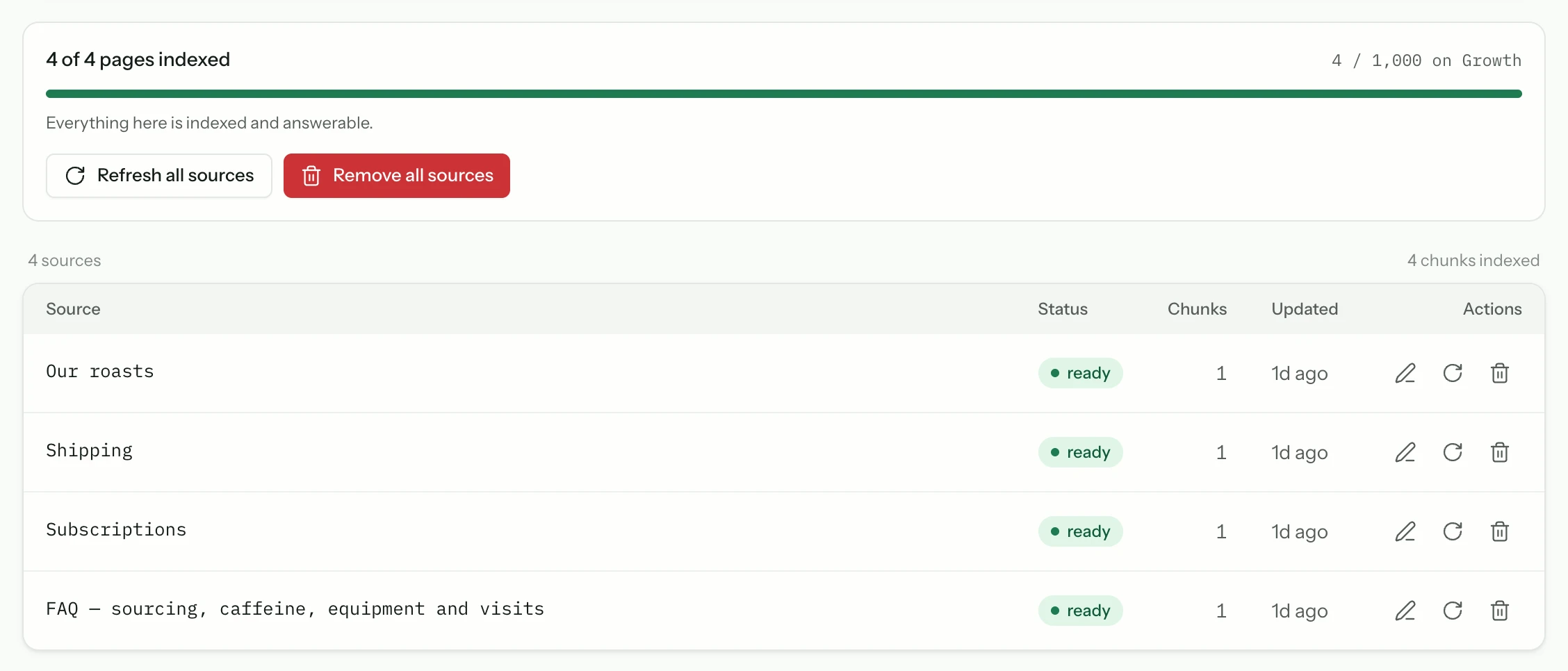
Missing pages
Usually means they are not linked from anywhere the crawler reached.
Noise
Archives and pagination dilute retrieval; remove them.
Ask it five questions you already know the answer to
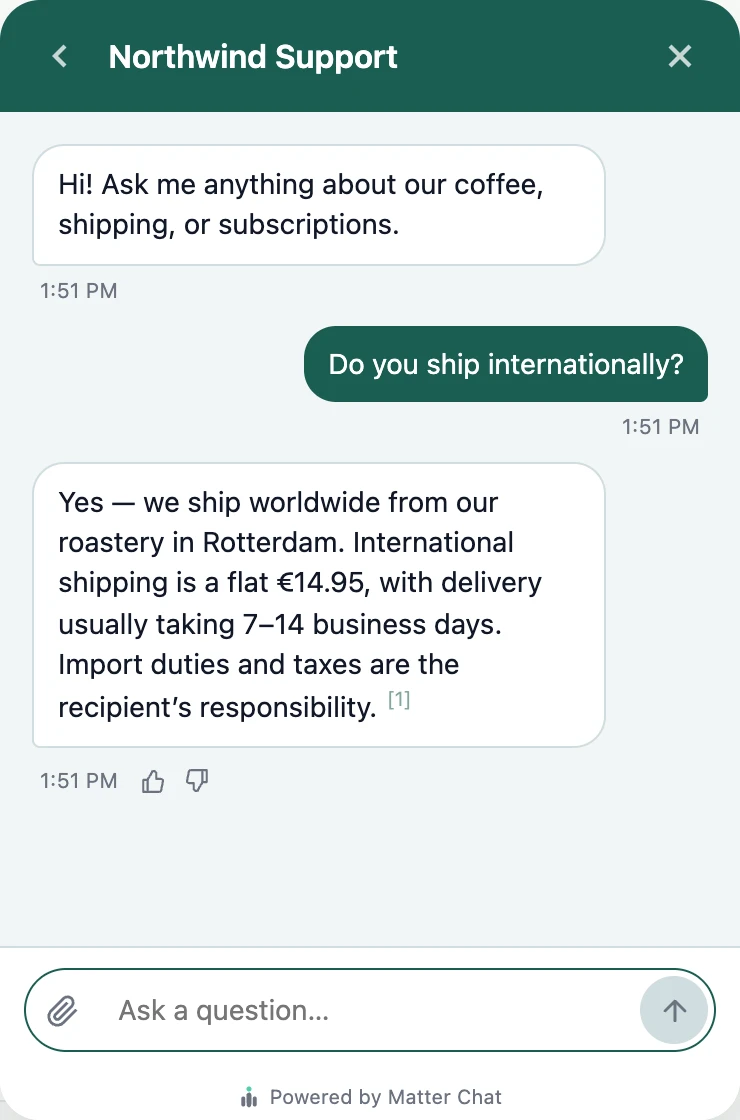
Open the Playground — your real widget on a staged page — and ask questions whose correct answers you can verify: your refund window, your pricing, your opening hours. Check the citation on each, not just the answer. A right answer citing the wrong page means retrieval is working by luck, and the next question will not be so lucky.
Fill the gaps you just found
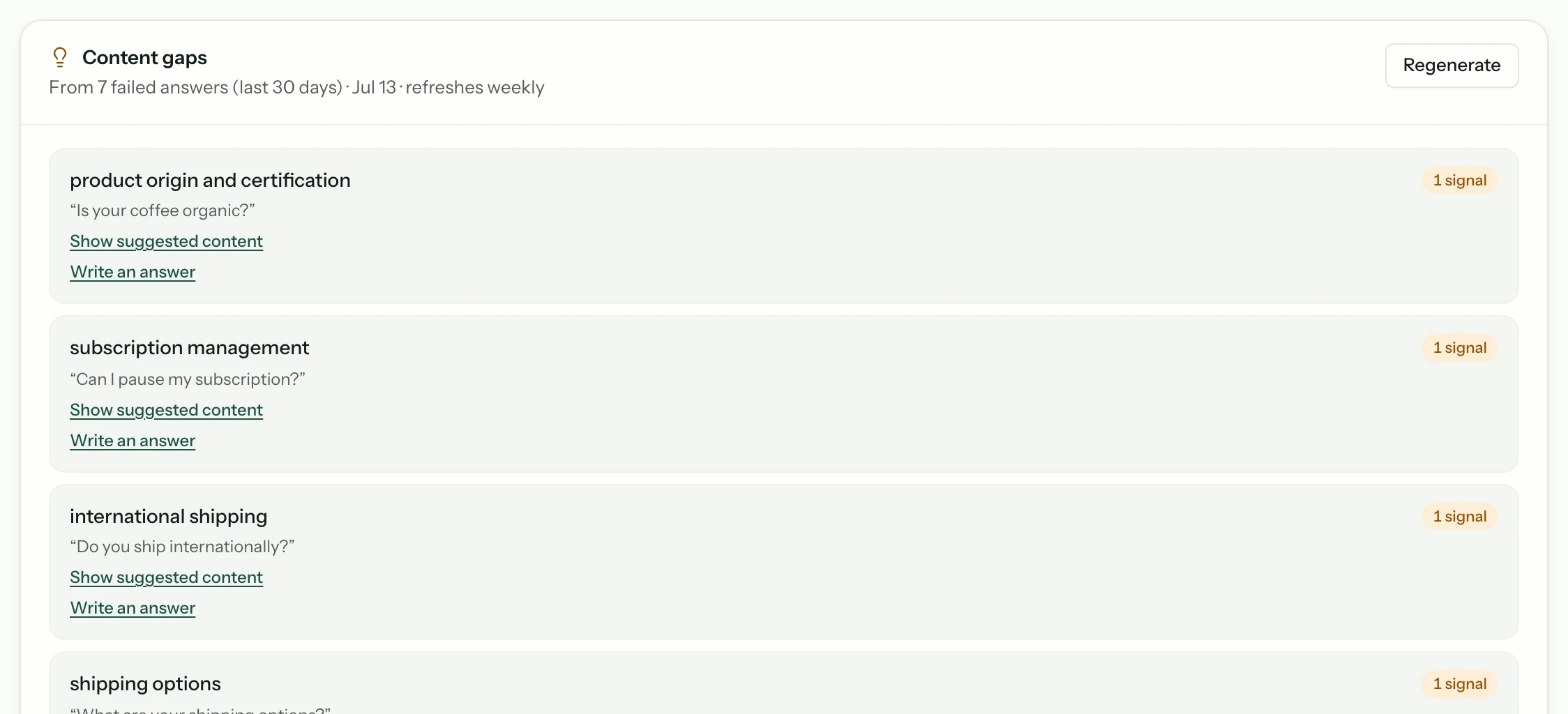
Anything it refused that it should have answered is a coverage problem: either the page exists and was not indexed, or the page does not exist. The first is a source fix, the second is a writing task. Analytics groups every refusal into themes under Content gaps, so you do not have to keep your own list.
Common questions
- How long does the first crawl take?
- It depends on the size of the site and how deeply pages are linked. A small marketing site is quick; a large documentation site takes longer. Wait for it to complete before testing, because a partial index produces refusals that are not real.
- Can I index more than one domain?
- Yes. Add each as its own source — commonly your marketing site plus a separate docs or help subdomain.
- What if content is behind a login?
- The crawler reaches publicly published pages. Gated material can be added as uploaded documents instead, so it is answerable without being public.
From the blog
All posts- BuildingWhat to index first when your site is a messStart with the pages that already resolve real support questions. Noise, archives, and unfinished docs can wait — indexing them first makes answers worse.Read
- BuildingStaging domains will poison your answers — fix that firstStaging, preview, and leftover demo hosts quietly win retrieval. Remove them from the index before you tune prompts or blame the model.Read
- BuildingLaunch checklist: five questions before you go liveBefore launch: confirm sources, citations, refusals, human handoff, and cost controls. If any fail, the widget is not ready — the model is not the issue.Read




Answer honestly. Capture the rest.
Point Matter Chat at your site and see what it can — and can't — answer. It's honest about both.
No credit card. 2 minute setup.
Every answer cites the source it came from. When there isn't one, it says so — and hands the visitor to you.


Installs on the tools you already run.