Most of the “Shopify vs Wix” question is settled by one sentence. Shopify is a commerce platform that also builds you a website; Wix is a website builder that can also run a shop. If selling is the business, the first is built around you from the first screen. If the shop is a corner of a site that is mostly about something else — a studio, a practice, a restaurant, a portfolio with a merch page — the second usually is. Everything below is detail on top of that sentence, and the detail matters, because the two platforms price, staff and extend themselves very differently.
A disclosure before the table: we make a support chatbot that installs on both platforms, so we have a reason to want you on either and no reason to prefer one. Nothing in this post is sponsored, we hold no affiliate links, and neither vendor gave us an account or a briefing. The prices and limits are the vendors' own, read on the date in the note below, the screenshots are of their public pages, and the receipts at the end list every figure with the page it came from.
Shopify vs Wix at a glance
 Shopify Shopify |  Wix Wix | |
|---|---|---|
| Built for | Selling. The admin is a store first; the website is a theme on top. | Building a site. The editor is a canvas; the store is a plan tier. |
| Free option | None — a 3-day free trial, then $1/month for 3 months | A free plan with no time limit, on a Wix subdomain |
| Entry paid plan | Basic, $29/mo billed yearly ($39 monthly) | Light, $17/mo — does not accept payments |
| First plan that sells | Basic, $29/mo | Core, $29/mo; Business at $39/mo is the one Wix recommends for a store |
| Online card fee | 2.9% + 30¢ on Basic, 2.7% Grow, 2.5% Advanced, 2.25% Plus | Not on the plans page; set per country by Wix Payments |
| Team seats | None on Basic, 5 on Grow, 15 on Advanced, unlimited on Plus | 2 on Light, 5 on Core, 10 on Business, 100 on Business Elite |
| In-person selling | Casual POS on every plan; POS Pro at $89/mo per location | Point of Sale offered; not detailed on the plans page |
| Templates | Theme Store, free and paid, built for product catalogues | “+2000 templates” across every kind of site; stores are one category |
| Custom code | Theme code is editable on every plan (theme.liquid) | A settings panel, on a published site with a connected domain |
| Support | 24/7 live chat on every plan; priority on Plus | 24/7 customer care on every plan |
- Running a store day to dayShopify · clearly
Orders, inventory, discounts, shipping and tax are the admin's home screen on Shopify. On Wix they are a plan tier inside a site editor.
- Getting a site live this afternoonWix · clearly
A free plan, thousands of templates by trade, and a drag-anything editor. Shopify's trial is three days and every path leads to a checkout.
- Price to be sellingeven
$29 against $29. Shopify Basic and Wix Core are the same number; the difference is what else the plan carries.
- Transparency of card feesShopify · clearly
Shopify prints its card rates beside every plan. Wix's plans page does not list a fee; the rate lives in a per-country help article.
- Team seats includedWix
Wix Core includes five collaborators at $29; Shopify Basic includes none, and five arrive with Grow at $79.
- A site that is mostly not a shopWix · clearly
Wix has a template for a therapy practice, a fitness trainer and a holiday rental. Shopify has themes for storefronts.
- Selling in personShopify
Shopify's POS is in every plan with a $89 Pro tier; Wix offers Point of Sale but does not detail it on its plans page.
Our read, not a score. Each marker is a judgement about who the criterion favours, and the sentence under it is what you can argue with. The facts behind each are in the sections below and in the receipts at the end.
What each one is built around
Open a new Shopify account and you are in a store admin: products, orders, customers, discounts, shipping, taxes. The website is a theme you pick and edit, and the editor works in sections rather than on a free canvas — it is very hard to make a Shopify page look broken, and correspondingly hard to make it look like anything other than a shop. Shopify's own pricing page describes the plans in commerce terms: “Sell online, in person, and in AI chats”, “world's best checkout”, “200+ real-time reports”. The website is assumed.
Open a new Wix account and you are asked what kind of site you are building, given a template for it, and dropped into a drag-and-drop editor that will let you put anything anywhere. Wix's plans page describes its plans in site terms — storage, collaborators, marketing suite — and the store arrives as a line item: “Basic eCommerce” on Core, “Standard eCommerce” on Business, “Advanced eCommerce” on Business Elite. Selling is a plan upgrade, not the starting point.
This is not a quality judgement. It is the reason the two feel so different a week in: a Shopify owner spends the week in orders and products; a Wix owner spends it in the editor. Pick the one whose week matches yours, and the rest of this post is about the price of that choice.
Getting started: a free plan versus a $1 trial
Wix has a free plan with no time limit. It gives you hosting on a Wix subdomain, the editor, and the template gallery, and it needs no card. Wix's own FAQ says the paid plan is what lets you connect your own domain and remove Wix branding, so the free plan is a real place to build and a poor place to launch a business from. Both vendors now lead with an AI builder: Wix's plans page says you can “create your site from a single prompt and flow between AI generation and drag and drop”, and Shopify's says you can “spin up your store from a simple prompt or with a pre-built template”. Neither of us has tested those against each other, and we would not trust a comparison that claims to have done so from a pricing page.
Shopify has no free plan. The trial is three days free, then $1 a month for three months, then the plan price. Three days is short, and it is short on purpose: Shopify wants you to import products, connect payments and make a sale, not to design for a fortnight. For a first-time seller that is a nudge; for a designer who wants to explore, it is a wall, and Wix's free plan is the better sandbox.
Pricing: Shopify starts at $29, Wix at $17 — but not for a store
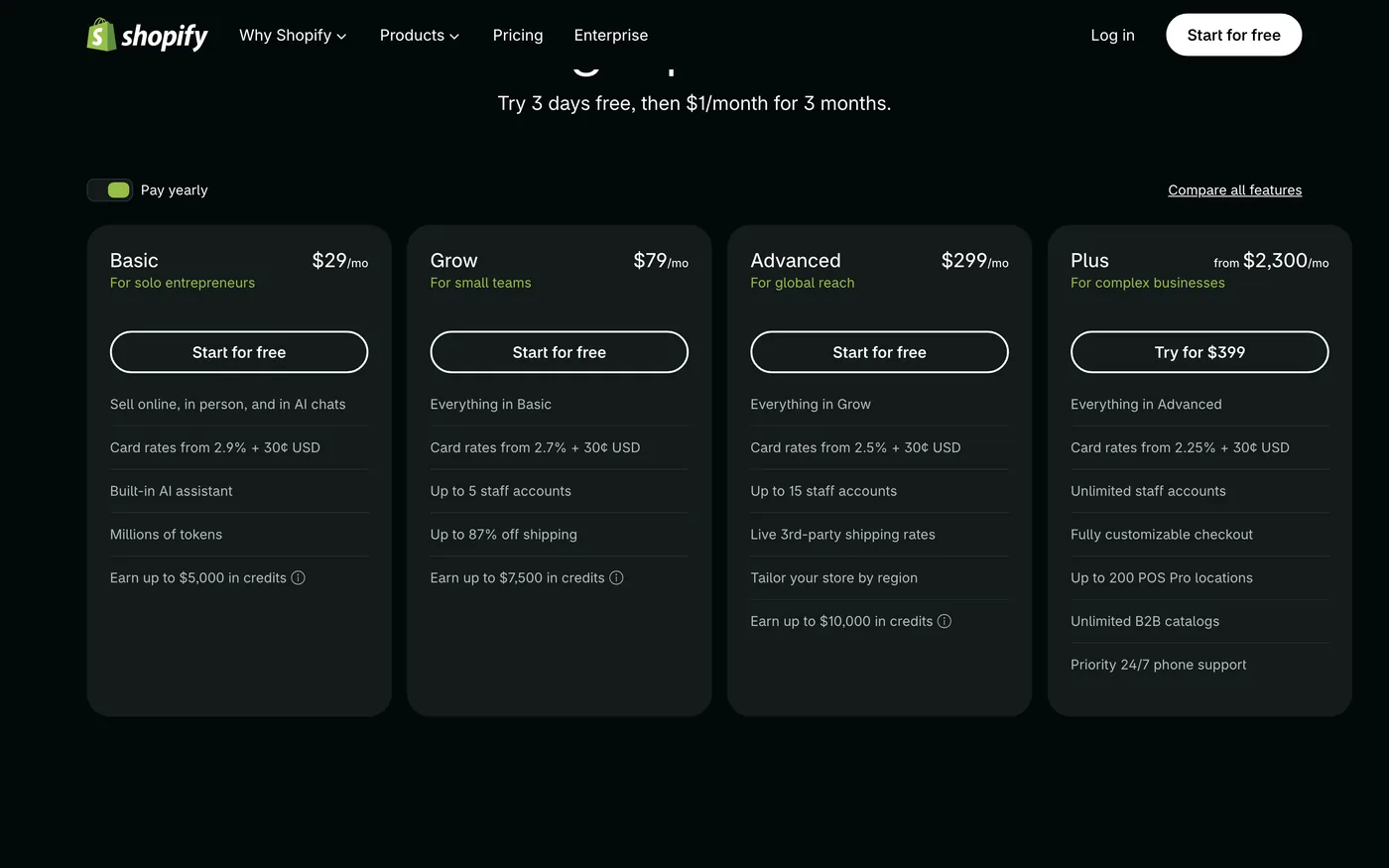
Shopify's four plans all run a store. Basic is $29 a month billed yearly or $39 monthly; Grow is $79 (or $105); Advanced is $299 (or $399); Plus starts at $2,300 and is a different conversation. What moves between them is the online card rate — 2.9% + 30¢ on Basic, 2.7% on Grow, 2.5% on Advanced, 2.25% on Plus — and the staff accounts: none on Basic, five on Grow, fifteen on Advanced, unlimited on Plus. Grow also adds “up to 87% off shipping” and Advanced adds live third-party shipping rates and the ability to tailor the store by region. Every plan earns 1% back on sales as Shopify credits, capped at $5,000 on Basic and rising by tier.
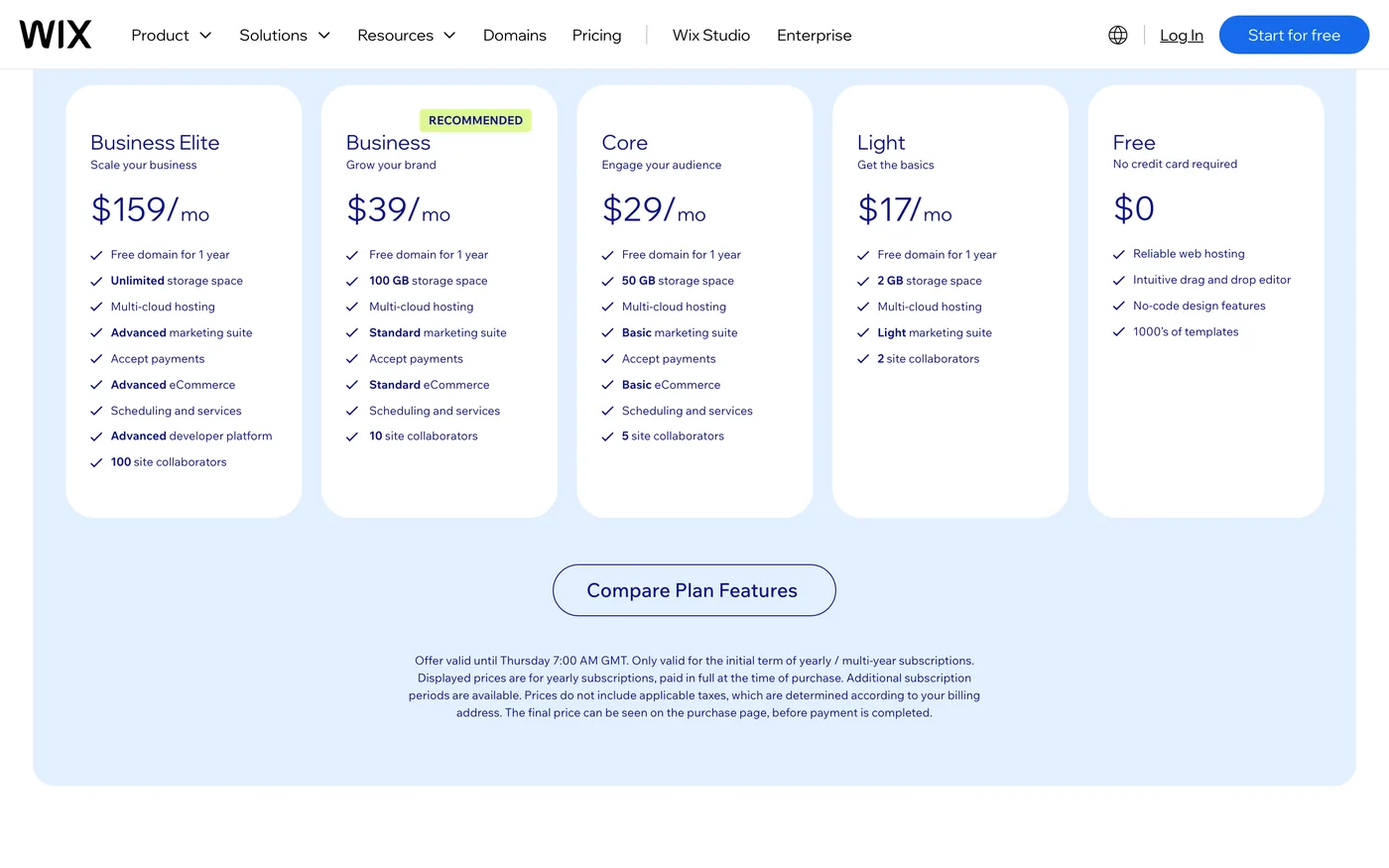
Wix's ladder is Free, then Light at $17 a month, Core at $29, Business at $39 and Business Elite at $159, all billed yearly with a free domain for the first year and a 14-day money-back guarantee. The line that matters for this comparison is that Light does not accept payments — it is a site plan with 2 GB of storage and a “light marketing suite”. The first Wix plan that sells is Core, at $29, with 50 GB, “basic eCommerce” and five collaborators. Business, at $39, is the one Wix marks as recommended, with 100 GB and “standard eCommerce”. So the honest price comparison is $29 against $29, not $29 against $17, and if you take Wix's own recommendation it is $29 against $39.
USD per month
Monthly price, billed yearly, read from each vendor's page on 16 September 2026. Wix Light is shown for scale: it is the entry plan, but it cannot sell.
Card fees are where the two pages stop being comparable. Shopify prints its rates next to each plan, including premium card rates, international surcharges, in-person rates and the fee for using a third-party payment provider. Wix's plans page does not list a transaction fee at all; the rate depends on Wix Payments in your country, and you find it in a help article rather than on the pricing page. If margin per order is the number you run the business on, get the Wix figure for your country before deciding — it is the one number in this comparison we could not put on a receipt.
Templates: a theme store versus a template gallery

Shopify's themes are storefronts. Free or paid, each one already has the collection page, the product page, the cart and the checkout, and the choice you are making is how the catalogue is presented — how many products per row, how the variant picker behaves, what the out-of-stock state looks like. That is the right set of decisions for a shop and a strange set for anything else.
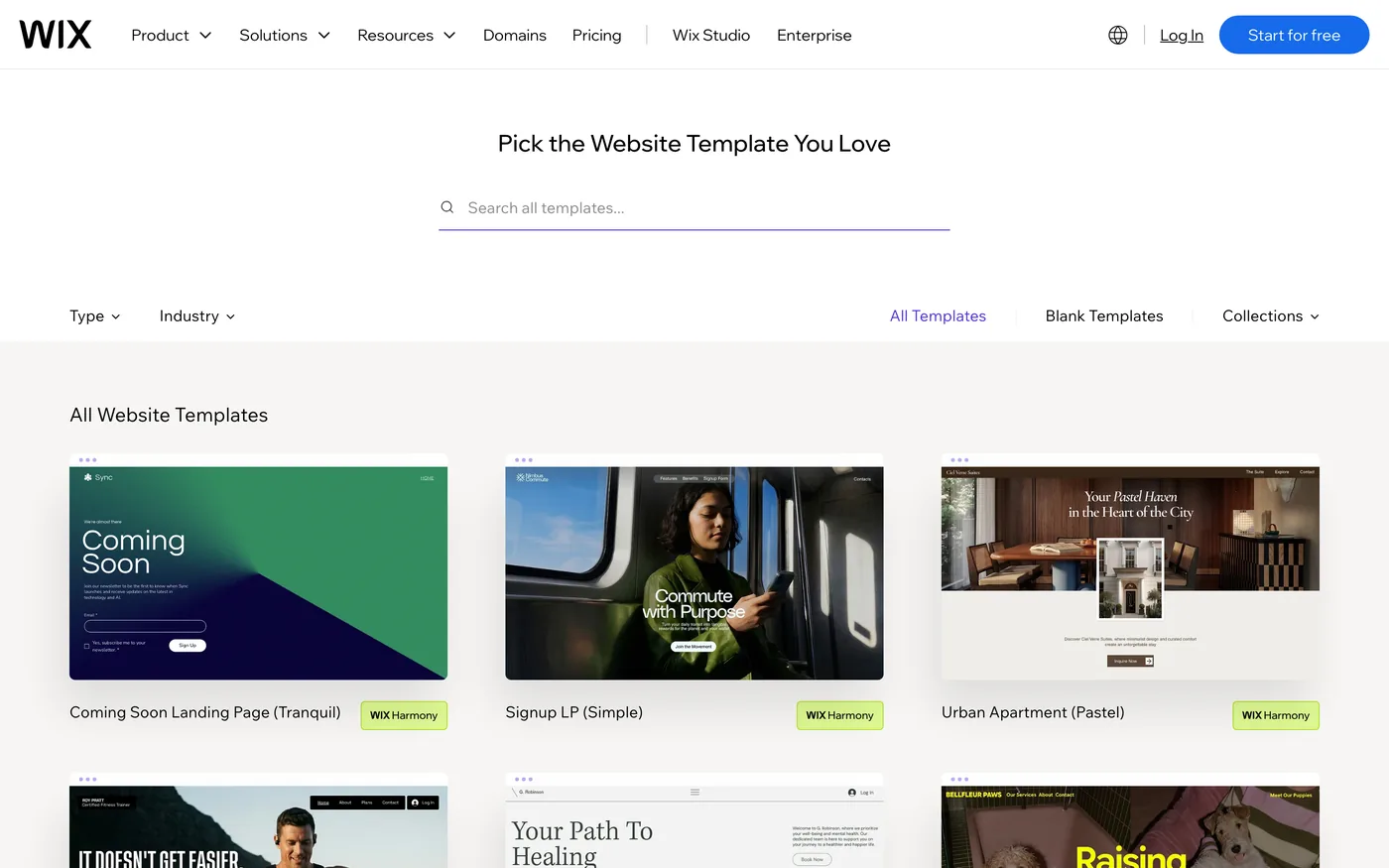
Wix's gallery is the opposite shape: more than two thousand templates, by Wix's own count, organised by the kind of business — fitness trainer, therapy practice, dog breeder, vacation rental, beauty store — and the online store is one category among dozens. The practical consequence: if the site is mostly not a shop, Wix has a template for it and Shopify does not. If it is mostly a shop, a Shopify theme has thought about things a general template has not.
Selling: channels, in-person and the team
Shopify's pricing page lists the places a store can sell on every plan: online, on social networks and marketplaces, in person, and — new in 2026 — “in AI chats”, through a catalogue that AI assistants can read. In-person selling is included on every plan for casual use, and POS Pro, for a physical shop with staff roles and in-store inventory, is $89 a month per location, or included for twenty locations on Plus. B2B selling with up to three catalogues is on every plan. This is the part of Shopify that Wix does not try to match: the plans page is a list of ways to take an order.
Wix's plans page lists “accept payments”, the eCommerce tier and “scheduling and services” from Core up. Point of Sale exists — it is in Wix's own navigation — but the plans page does not detail it, so we cannot compare it here. What Wix does put on the plans page that Shopify does not is the team: two collaborators on Light, five on Core, ten on Business, a hundred on Business Elite. Shopify Basic includes no additional staff accounts; five arrive with Grow at $79 and fifteen with Advanced at $299. For a two-person business that is a real difference at the entry price: on Wix Core your colleague has a login; on Shopify Basic they use yours.
Seats
Additional staff accounts (Shopify) and site collaborators (Wix) as listed on each pricing page on 16 September 2026. Shopify Plus is unlimited and is not drawn.
Marketing, analytics and support
Wix sells its marketing as a suite that grows with the plan — “light” on Light, “basic” on Core, “standard” on Business, “advanced” on Business Elite — and its plans page promises built-in SEO tools and 24/7 customer care on every plan. Shopify lists “200+ real-time reports, plus custom analytics” on every plan, 24/7 live chat support on Basic and Grow, “enhanced” live chat on Advanced and priority support on Plus, and a built-in AI assistant called Sidekick with “millions of tokens” a month. Both pages are marketing pages describing marketing tools, so treat the adjectives lightly; the concrete facts are that both offer round-the-clock support on every paid plan and that Shopify's reporting is listed as a plan feature where Wix's is folded into the suite.
Custom code and apps
Both let you paste a script, and both have an app directory, and the two are used in different proportions. On Shopify the theme code is yours to edit on every plan — the file is called theme.liquid, and the standard practice is to duplicate the theme, edit the copy, preview and publish. The App Store is large, and apps run inside the admin, so a store tends to accumulate them; Shopify's own page calls it “the largest commerce ecosystem”. On Wix, custom code is a panel under Settings, available once the site is published with a connected domain, with a choice of head, body-start or body-end placement, and the App Market is where most additions come from.
Neither is a reason to choose one over the other. Both take third-party code; both have a directory. What differs is whether you would rather edit a theme file or use a settings panel, and whether the things you want to add are commerce apps, where Shopify's directory is deeper, or site apps, where Wix's is.
How Matter Chat installs on each
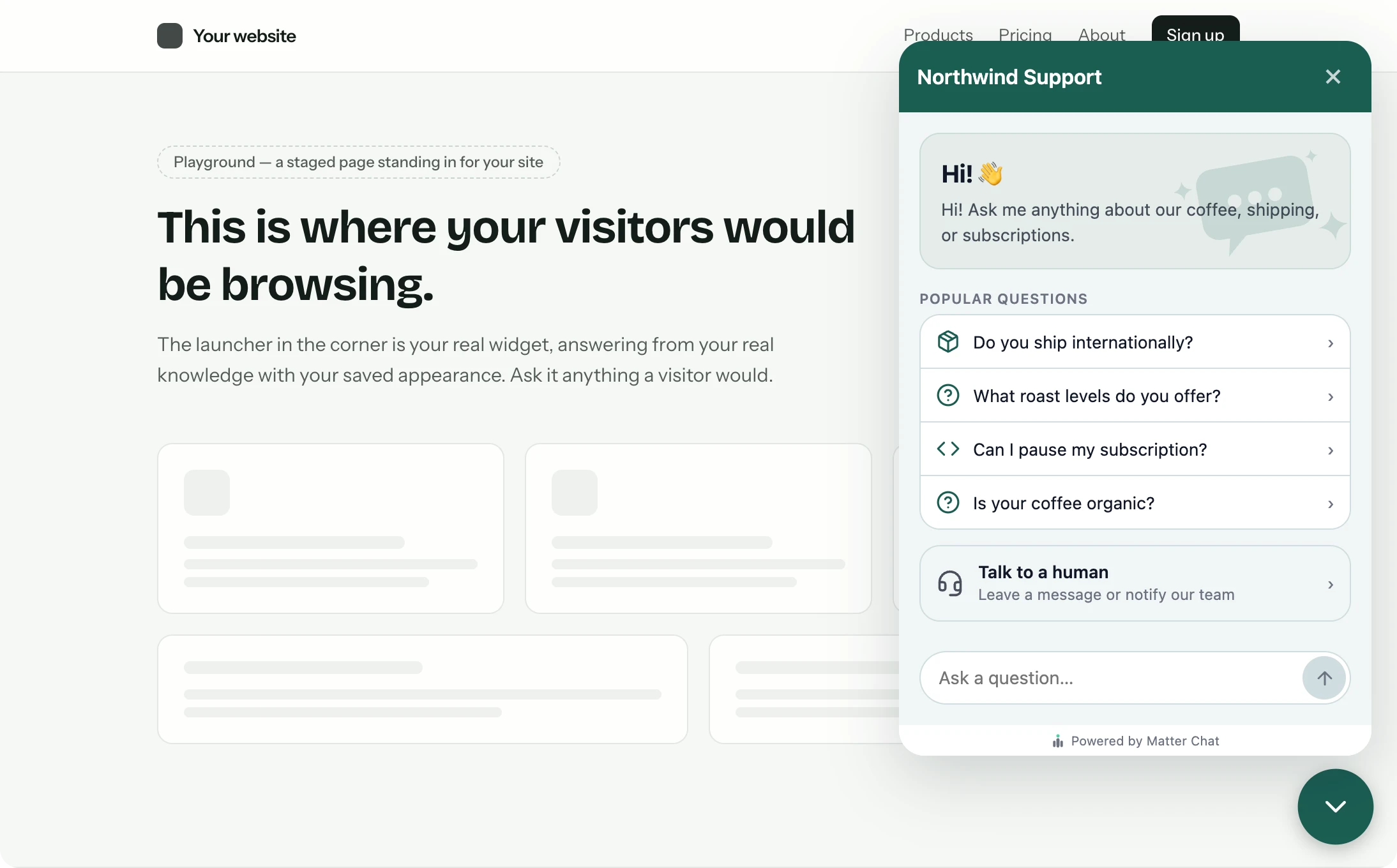
The part we can speak to first-hand. Matter Chat is a support assistant that answers visitors from your own pages — shipping, returns, sizing, opening hours — with a citation to the page it read, and refuses rather than guessing when your content does not cover the question. It does not read order data; an order-specific question escalates to you with the conversation attached. It installs on both platforms, differently.
On Shopify
Two routes. The manual one is the two-line snippet pasted into theme.liquid just before the closing body tag, on a duplicated theme, then published — it loads on every storefront page and a theme change cannot break it. The app route runs inside the Shopify admin: install the Matter Chat app, switch it on as an app embed in the theme editor, and leave the “Bot key” field empty — the storefront's own domain is matched to the bot, so there is no key to paste and no theme code to touch. The Shopify page has the click path for the snippet.
On Wix
Also two routes, and here the app is the one to take. From the bot's Install tab, press Add to Wix, approve the app, and we embed the widget script on the site through Wix's own Embedded Scripts API and pre-allow the site's domain — nothing to paste, no panel to find. The manual route is Settings → Custom code, the snippet set to load on all pages in the Body – end position, on a published site with a connected domain. The Wix guide walks through both.
On either platform it reads the same pages: products, policies, FAQs, whatever is published. What it costs does not depend on the platform — a reply is one answer to a visitor, and the plan has a hard daily cap rather than overage, so a Black Friday spike raises conversations and not the bill. The pricing page has the tiers; the trial needs no card.
Shopify vs Wix: which is best?
The verdict
Which one, for whom

ChooseShopify if…
- The business is the shop. Every plan sells, the admin is built around orders, and the themes are storefronts.
- You need to know your card fees before you sign up — they are printed beside every plan.
- You sell in person, on marketplaces, or to other businesses, and want that in the platform rather than in an app.
- You expect to grow into staff, locations and regions; the ladder from Basic to Plus is built for that.
ChooseWix if…
- The shop is a part of a site that is mostly about something else, and there is a template for that something else.
- You want a free plan to build on, and time to decide before paying.
- A colleague needs their own login on day one; Core includes five collaborators at $29.
- You would rather work in a page editor than in a store admin.
Neither, if you already run WordPress and have someone who maintains it — read Shopify vs WooCommerce — or if the site is a designer's build with no store at all, in which case Webflow vs Wix is the comparison.
If you cannot decide, price the card fees for your country and your monthly order count. On the plans alone the two cost the same; on fees they may not, and the fee is the number that compounds.
Questions people ask
- Is Wix cheaper than Shopify?
- For a site, yes: Wix Light is $17 a month and Wix has a free plan, while Shopify has no free plan and starts at $29. For a store, no: the first Wix plan that accepts payments is Core at $29, the same as Shopify Basic, and Wix's recommended store plan is Business at $39. Card fees may tip it either way and are not on Wix's plans page.
- Can I sell on Wix's free plan?
- No. The Free and Light plans do not include accepting payments; Core at $29 is the first that does, according to Wix's plans page on 16 September 2026.
- Does Shopify have a free plan?
- No. It has a 3-day free trial followed by $1 a month for the first 3 months, then the plan's normal price.
- Which has lower transaction fees, Shopify or Wix?
- Shopify publishes 2.9% + 30¢ for online cards on Basic, falling to 2.25% on Plus, plus a fee for using a third-party payment provider. Wix does not publish a rate on its plans page; Wix Payments fees are set per country. Look up your country's rate before comparing.
- Can I move from Wix to Shopify later, or the other way?
- Products and customers export from both as CSV; the site design does not travel in either direction. Plan for a rebuild of the pages, not of the catalogue.
- Can I add an AI support chatbot to Shopify or Wix?
- Yes, on both. Matter Chat installs on Shopify as an app or a two-line snippet in theme.liquid, and on Wix as an app that embeds the script through Wix's API or as a pasted snippet in the custom-code panel. It answers from your published pages with a citation and refuses when they do not cover the question.
Receipts
where every number came from
- 01Shopify Basic $29/mo yearly, $39 monthly; Grow $79/$105; Advanced $299/$399; Plus from $2,300shopify.com/pricingread 16 Sep 2026
- 02Shopify trial: 3 days free, then $1/month for 3 monthsshopify.com/pricingread 16 Sep 2026
- 03Shopify online card rates 2.9% / 2.7% / 2.5% / 2.25% + 30¢ by planshopify.com/pricingread 16 Sep 2026
- 04Shopify staff accounts: 0 / 5 / 15 / unlimited by plan; POS Pro $89/mo per locationshopify.com/pricingread 16 Sep 2026
- 05Wix plans: Free $0, Light $17, Core $29, Business $39, Business Elite $159, yearlywix.com/plansread 16 Sep 2026
- 06Wix: Light does not list 'accept payments'; Core, Business and Business Elite dowix.com/plansread 16 Sep 2026
- 07Wix collaborators: 2 / 5 / 10 / 100 by plan; 14-day money-back; free domain 1 yearwix.com/plansread 16 Sep 2026
- 08Wix free plan: connecting your own domain and removing Wix branding need a paid planwix.com/plans (FAQ)read 16 Sep 2026
- 09Wix custom code needs a published site with a connected domainsupport.wix.comread 16 Sep 2026
9 lines · prices change · the page is the source