This comparison is really about one question: do you want to run a store, or run a store and a server? Shopify is hosted — you pay a monthly plan, and the checkout, the hosting, the security and the updates are its problem. WooCommerce is a free plugin for WordPress — the store is yours, on hosting you choose, with extensions you pick, and all of it is your problem, or your developer's. Both are enormous: WooCommerce's own homepage claims more than two million online stores built on it and 26% of the top million ecommerce sites; Shopify's pricing page claims $1.1 trillion in merchant sales and a first sale every 26 seconds.
Disclosure: we make a support chatbot that installs on both — as an app on Shopify, as a WordPress plugin on WooCommerce — so we have no reason to steer you, and nothing here is sponsored or affiliated. The numbers are the vendors' own, read on the date in the note, the screenshots are of their public pages, and the receipts at the end list every figure with its page.
Shopify vs WooCommerce at a glance
 Shopify Shopify |  WooCommerce WooCommerce | |
|---|---|---|
| What it is | A hosted commerce platform with its own admin, checkout and themes | A free, open-source plugin that turns a WordPress site into a store |
| Platform fee | Basic $29/mo billed yearly ($39 monthly); Grow $79; Advanced $299; Plus from $2,300 | $0 — “no platform fees, no revenue share” |
| What you pay instead | Nothing else required to be live | Hosting, “$25–$350/month for most stores”; extensions “$29–$299/year” each |
| Online card fee | 2.9% + 30¢ on Basic, 2.7% Grow, 2.5% Advanced, 2.25% Plus | WooPayments “~2.50–2.90% + 30¢”, or any processor you choose |
| Using another payment provider | An additional fee per transaction (2% on Basic, by Woo's table) | None — “use any gateway or BNPL provider without penalty” |
| Trial | 3 days free, then $1/month for 3 months | Free to install; hosting trials vary by host |
| Staff | None on Basic, 5 on Grow, 15 on Advanced, unlimited on Plus | WordPress users — no seat limit in the plugin |
| In-person | Casual POS on every plan; POS Pro $89/mo per location | Through extensions and WooPayments hardware; not priced on the page |
| Who maintains it | Shopify | You, or your host |
| Custom code | Theme files editable on every plan | It is WordPress: themes, plugins, hooks and the whole file system |
- One bill, no serverShopify · clearly
Shopify's plan is the whole platform cost. Woo's is hosting plus extensions plus whoever keeps WordPress updated.
- Cheapest possible storeWooCommerce · clearly
Woo on $25 hosting with no extensions undercuts Shopify Basic at $29 — and there is no platform fee to grow into.
- Predictable cost at scaleShopify
Shopify's ladder is printed. Woo's hosting range runs to $350 and extensions add $29–$299 a year each; Woo's own page says it scales with traffic.
- Freedom to pick a payment processorWooCommerce · clearly
Woo charges nothing for using any gateway. Shopify adds a per-transaction fee when you do not use Shopify Payments.
- Selling in person and on marketplacesShopify · clearly
Shopify lists POS, social, marketplaces and AI-chat selling on every plan. On Woo each is an extension.
- Subscriptions and unlimited variantsWooCommerce
Woo's page says subscriptions carry no extra processing fee with its own extension and variants are unlimited; it says Shopify caps variants and relies on apps for subscriptions.
- Who fixes it at 2 a.m.Shopify · clearly
Shopify. With Woo it is you, your developer, or the managed host you are paying $350 to be that person.
Our read, not a score. Each marker is a judgement about who the criterion favours, and the sentence under it is what you can argue with. The facts behind each are in the sections below and in the receipts at the end.
What you are actually paying for
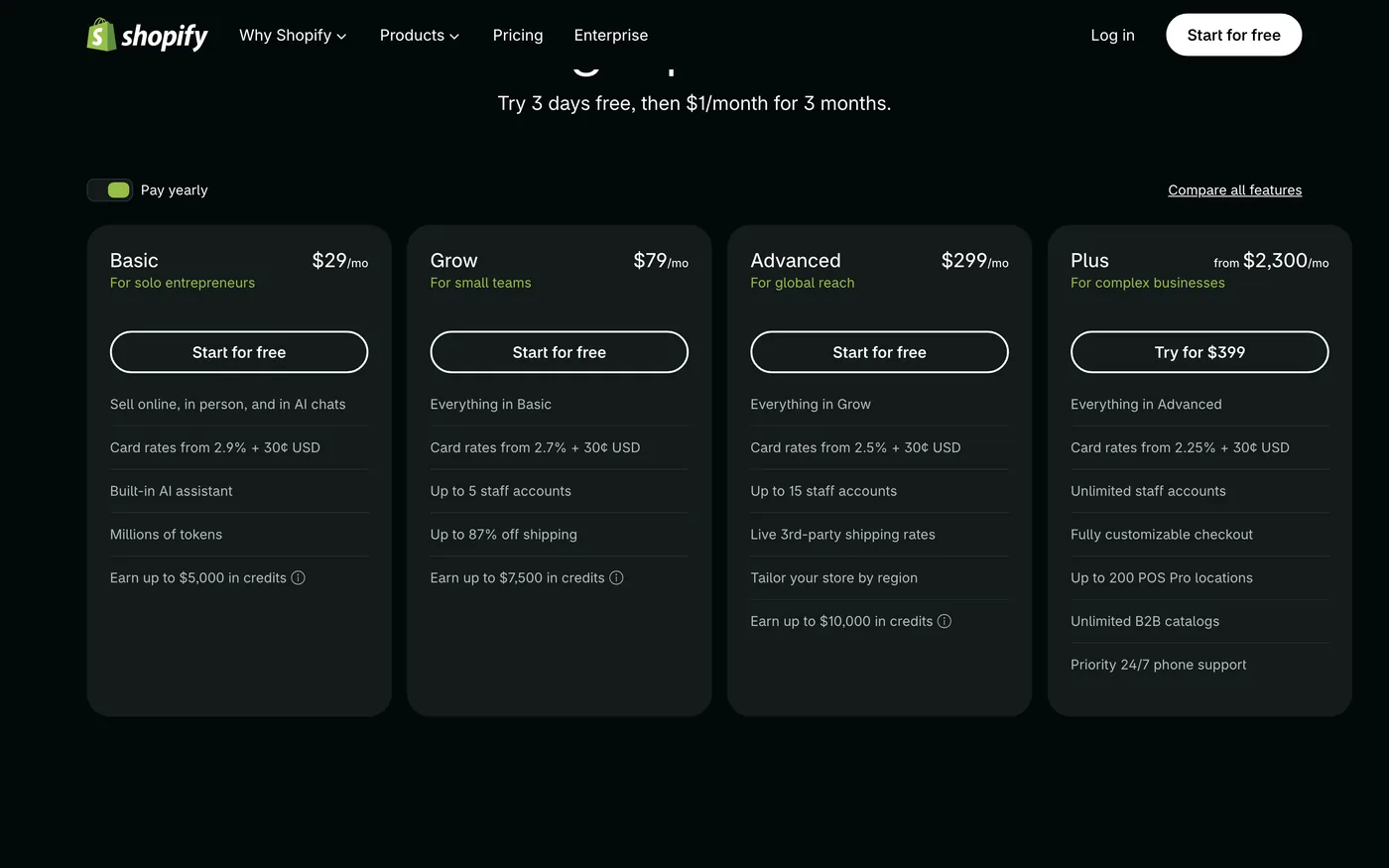
Shopify's bill is the plan. Basic is $29 a month billed yearly or $39 monthly; Grow is $79 or $105; Advanced is $299 or $399; Plus starts at $2,300 and includes a fully customisable checkout, unlimited staff and up to 200 POS Pro locations. That covers hosting, the checkout, the admin, security and updates, and every plan includes the online store, unlimited products, ten inventory locations, B2B with up to three catalogues, 200+ reports and 24/7 live chat support. The variable cost is the online card rate — 2.9% + 30¢ on Basic, 2.7% on Grow, 2.5% on Advanced, 2.25% on Plus — plus 1% on international cards, and staff seats: none on Basic, five on Grow, fifteen on Advanced. The trial is three days free then $1 a month for three months, and every plan earns 1% back on sales as Shopify credits.
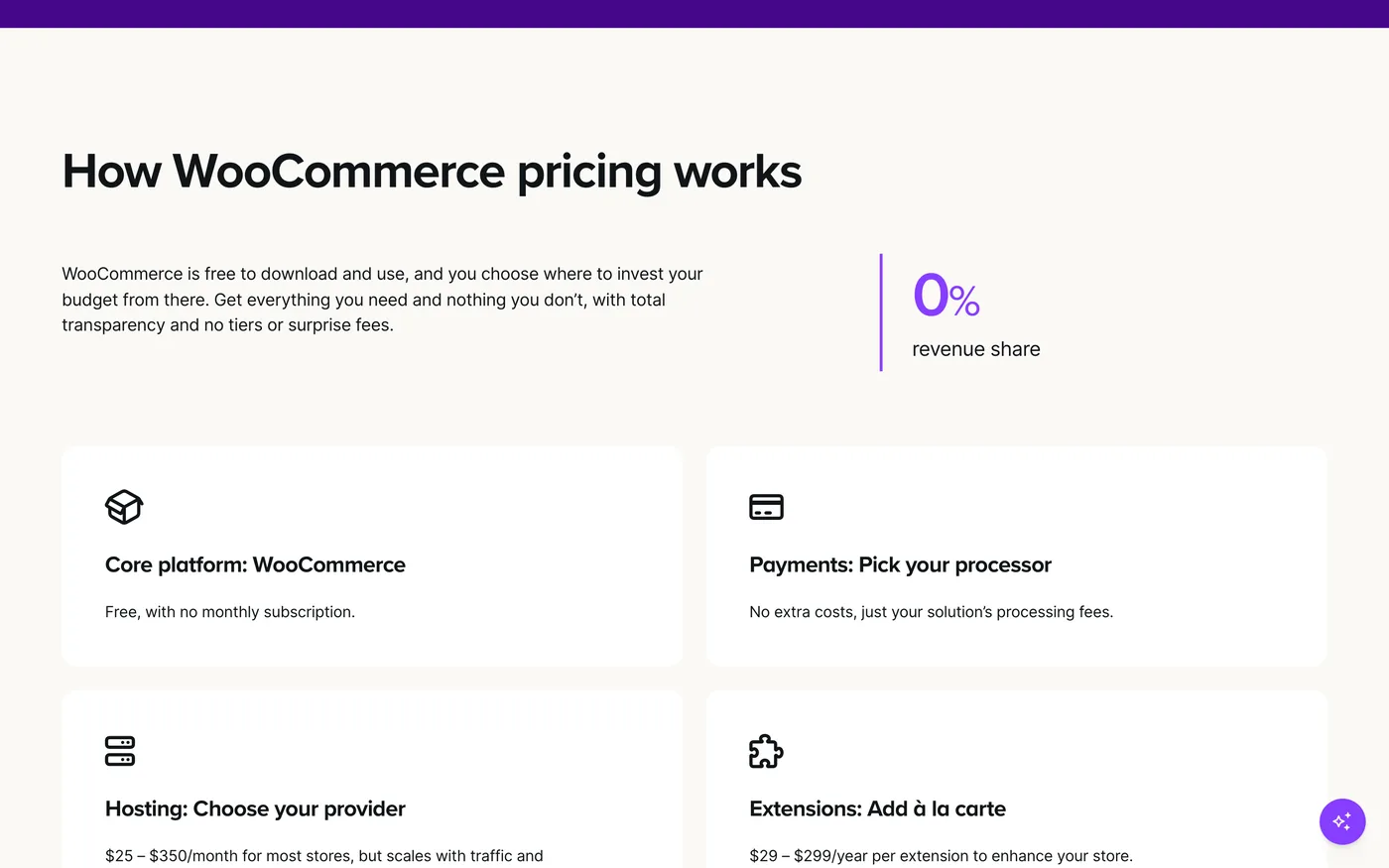
WooCommerce's page does not sell a plan because there is none. The core platform is free, with unlimited products, orders and APIs, no monthly subscription and no revenue share. What you pay for is around it: hosting, which the page puts at $25 to $350 a month for most stores “but scales with traffic and performance needs”; extensions, $29 to $299 a year each, for anything the core does not do; and payments, through WooPayments at roughly 2.5% to 2.9% plus 30¢, or any other processor you connect. A small store on cheap hosting with no extensions can be live for less than Shopify Basic. A store with a dozen extensions on managed hosting can cost more than Shopify Grow. The page is honest about this: it calls the model à la carte and links a cost estimator.
USD per month
Shopify plans as printed on 16 September 2026. WooCommerce's platform fee is zero; the bars show the low and high ends of the hosting range its pricing page gives for most stores. Extensions are yearly and not drawn.
Card fees, and the fee for not using Shopify Payments
Shopify Basic charges 2.9% + 30¢ for an online card payment, 3.5% + 30¢ for premium cards, and an extra 1% for international cards; in-person cards are 2.6% + 10¢. WooPayments quotes roughly 2.5% to 2.9% + 30¢, and Woo lets you use a different processor if one gives you a better rate. On card fees alone the two are within a fraction of a percent of each other at the entry level; Shopify's rate improves as you move up its plans, and Woo's improves if you negotiate with a processor.
The row that separates them is the one Woo's page is built around: what happens when you do not use the platform's own processor. Woo says “use any gateway or BNPL provider without penalty” and “run multiple gateways”. Shopify's pricing page lists a third-party payment provider fee, and Woo's own comparison table puts it at 2% per transaction on Basic and 0.6% on Advanced — Woo's figures, which match the line on Shopify's page. If you already have a merchant account with a good rate, or you sell in a market where Shopify Payments is not available, this is the fee that decides the comparison.
% per transaction
Shopify Basic standard online rate, and the range WooPayments quotes, as printed on 16 September 2026. Both add 30¢ per transaction. Woo's low end is shown; a negotiated processor can be lower still.
Subscriptions, variants and markets: Woo's own comparison
Woo's pricing page carries a comparison table against Shopify, BigCommerce, Salesforce, Wix Enterprise and Adobe Commerce, and it is worth reading because it names the rows a growing store meets second. Woo says subscription billing is free with its own WooCommerce Subscriptions extension, while on Shopify it costs roughly 1% to 3% through an app because there is no native subscription billing; that product variants are unlimited on Woo and capped at 2,048 per product with three option types on Shopify; and that selling in international markets costs nothing on Woo, while Shopify includes three markets and charges $59 a month per market beyond that on Advanced.
These are Woo's claims about a competitor, on Woo's page, so treat them the way you would treat ours about anyone: as the thing to verify, not the verdict. Shopify's own page does not contradict the variant limit or the third-party payment fee, and it does list “tailor your store by region” as an Advanced feature, which is consistent with a per-market charge. What Woo's table leaves out is the other column — that on Shopify the checkout, the hosting and the updates are included, and on Woo each is a line you pay for or a job you do.
Themes, extensions and who fixes it at 2 a.m.

Shopify's themes come from its Theme Store, its apps from its App Store, and both run on infrastructure Shopify maintains — a platform update does not take your checkout down, because the checkout is theirs. Shopify's page calls its App Store “the largest commerce ecosystem” and ships “150+ updates to Shopify, twice a year”, none of which you install. WooCommerce is WordPress: any WordPress theme with Woo support, any plugin, any host. That is the freedom people choose it for, and it is also the maintenance. Core, theme, Woo and every extension update on their own schedules, and when two disagree, the store owner or their developer sorts it out. Managed WordPress hosts sell exactly this problem back to you, which is a large part of why the hosting range on Woo's page runs to $350.
Woo's page makes the counter-argument plainly: “customizations that stay yours”, “costs tied to infrastructure, not sales volume”, and no features “locked away behind higher-priced plan tiers”. Both are true. The question is whether you would rather pay Shopify to own the problem or pay a host and a developer to own the store.
Custom code
Shopify's theme files are editable on every plan — the layout is theme.liquid, and the convention is to duplicate the theme, edit the copy and publish. Checkout customisation is the exception: “fully customizable checkout” is a Plus feature. WooCommerce is WordPress, so there is no custom-code panel because the whole thing is custom code: child themes, plugins, hooks, the file system, and a checkout you can change on any plan because there are no plans. If you have a WordPress developer, Woo gives them everything. If you do not, Shopify gives you a store you cannot break.
How Matter Chat installs on each
This is the part we know first-hand. Matter Chat answers shoppers from the pages you already published — shipping, returns, sizing, product pages — with a citation to the page, and it refuses rather than inventing a policy when the content does not cover the question. It does not read order data; an order-specific question escalates to you with the conversation attached, and the questions it could not answer become a list of pages to write.
On Shopify
Two routes. The manual one is the two-line snippet in theme.liquid, just before the closing body tag, on a duplicated theme, then published. The app route runs inside the Shopify admin: install the Matter Chat app, turn it on as an app embed in the theme editor and leave the “Bot key” field empty — the storefront's domain is matched to the bot automatically, so there is no key to paste and no theme code to edit. The Shopify page has the snippet route step by step.
On WooCommerce
It is a WordPress site, so it is the WordPress plugin: Plugins → Add New → Upload, then paste your bot's public key under Settings → Matter Chat and press Verify. The plugin adds the two script tags to every front-end page, product pages included, and a theme or core update cannot remove them. If your host forbids uploading plugins, the snippet still goes into a code-snippet plugin such as WPCode, or a child theme's footer. The WordPress page covers all three.
On either platform the bill is the same shape and does not depend on the store's traffic: a reply is one answer to a visitor, and a hard daily cap replaces overage, so a sale weekend raises conversations and not the invoice. The pricing page has the tiers; the trial needs no card.
Shopify vs WooCommerce: which is best?
The verdict
Which one, for whom

ChooseShopify if…
- You want one bill and no server. Basic at $29 is the whole platform cost and updates are somebody else's job.
- You sell in person, on marketplaces or to other businesses and want that on the platform, not in extensions.
- You will use Shopify Payments, so the third-party processor fee never applies to you.
- Nobody on the team wants to be the person who maintains WordPress.
ChooseWooCommerce if…
- You already run WordPress and someone maintains it.
- You want to choose your host, your processor and your extensions, and pay no penalty for any of them.
- You sell subscriptions, many variants or into many markets, and Woo's rows on those are the ones that cost you on Shopify.
- The store is small enough for $25 hosting, or large enough that owning the stack is worth a developer.
Neither, if the site is mostly not a shop — Shopify vs Wix covers that case — and read Webflow vs Wix if there is no store at all.
Do the sum before deciding on price. Woo on cheap hosting with no extensions undercuts Shopify; Woo on managed hosting with a dozen extensions does not. Woo's own cost estimator and Shopify's plan compare page are both free, and an hour with them is worth more than any verdict, ours included.
Questions people ask
- Is WooCommerce really free?
- The plugin is free, with no platform fee and no revenue share. A live store still needs WordPress hosting, which Woo's page puts at $25 to $350 a month for most stores, and any extensions you add cost $29 to $299 a year each. Card processing costs its own fee on either platform.
- Is Shopify cheaper than WooCommerce?
- It depends on the hosting. Shopify Basic is $29 a month all in. WooCommerce on $25 hosting with no extensions is cheaper; on $100 managed hosting with a few extensions it is not. Card fees are within a fraction of a percent at the entry level. Prices read on 16 September 2026.
- Does Shopify charge extra for using PayPal or Stripe?
- Shopify's pricing page lists a fee for using a third-party payment provider instead of Shopify Payments; WooCommerce's comparison table puts it at 2% per transaction on Basic and 0.6% on Advanced. WooCommerce charges no such fee for any gateway.
- Which is better for subscriptions, Shopify or WooCommerce?
- WooCommerce's page says subscription billing is free with its own Subscriptions extension, and that Shopify has no native subscription billing and relies on apps charging roughly 1% to 3%. That is Woo's claim about Shopify; verify it against the app you would use.
- Can I move from WooCommerce to Shopify, or back?
- Products, customers and orders export as CSV from both, and each vendor publishes a migration guide for the other. The theme does not travel, and on WooCommerce the rest of the WordPress site stays where it is.
- Can I add an AI support chatbot to Shopify or WooCommerce?
- Yes. Matter Chat installs on Shopify as an app or a two-line snippet in theme.liquid, and on WooCommerce through the Matter Chat WordPress plugin, or a snippet in WPCode or a child theme. It answers from your published pages with a citation and refuses when they do not cover the question.
Receipts
where every number came from
- 01Shopify Basic $29/mo yearly, $39 monthly; Grow $79/$105; Advanced $299/$399; Plus from $2,300shopify.com/pricingread 16 Sep 2026
- 02Shopify online card rates 2.9% / 2.7% / 2.5% / 2.25% + 30¢; premium 3.5% on Basic; international +1%; in-person 2.6% + 10¢shopify.com/pricingread 16 Sep 2026
- 03Shopify: staff 0 / 5 / 15 / unlimited; POS Pro $89/mo per location; B2B 3 catalogues; 10 inventory locations; 24/7 live chatshopify.com/pricingread 16 Sep 2026
- 04Shopify trial 3 days free then $1/month for 3 months; 1% back in creditsshopify.com/pricingread 16 Sep 2026
- 05WooCommerce: free core, 0% revenue share, no platform feewoocommerce.com/pricingread 16 Sep 2026
- 06Woo hosting $25–$350/month for most stores; extensions $29–$299/year eachwoocommerce.com/pricingread 16 Sep 2026
- 07WooPayments ~2.50–2.90% + 30¢; no fee for third-party gatewayswoocommerce.com/pricingread 16 Sep 2026
- 08Woo's own table: Shopify third-party payment fee 2% (Basic) / 0.6% (Advanced); variants capped at 2,048; $59/mo per market after 3 on Advancedwoocommerce.com/pricing (Woo's claim)read 16 Sep 2026
- 09WooCommerce homepage: 2M+ online stores; 26% of the top 1 million ecommerce siteswoocommerce.comread 16 Sep 2026
9 lines · prices change · the page is the source