Both build websites without code, and that is where the resemblance stops. Wix is the builder for the owner: templates for every trade, a drag-anything editor, a free plan to start on, and a store or a booking system that arrives as a plan tier. Webflow is the builder for the designer: a canvas that behaves like CSS because it is CSS, a CMS with real collections, hosting priced per site, and a ladder whose top rung is a $2,500-a-month platform plan. The question is not which is better; it is who is going to be sitting at it, and what the site has to become in two years.
Disclosure: we make a support chatbot that installs on both — through an app on each, or a two-line snippet — so we have no side here. Nothing is sponsored and there are no affiliate links. Prices and limits below are the vendors' own, read on the date in the note, the screenshots are of their public pages, and the receipts at the end list every figure with its page.
Webflow vs Wix at a glance
 Webflow Webflow |  Wix Wix | |
|---|---|---|
| Built for | Designers and teams who want layout control and a CMS | Owners who want a site up without learning a tool |
| Free plan | Starter: Webflow subdomain, 2 static pages, 1 GB bandwidth, 50 form submissions | Free: Wix subdomain, no time limit, the full editor and template gallery |
| Entry paid plan | Basic, $15/mo — your own domain, 300 static pages, 10 GB, no CMS | Light, $17/mo — 2 GB storage, 2 collaborators, free domain for a year |
| First plan with a CMS / store | Premium, $25/mo, adds Webflow CMS, site search and code components | Core, $29/mo, first plan that accepts payments; 5 collaborators |
| Ecommerce | Separate Ecommerce plans: Standard $29 (2% fee, 500 items), Plus $74 (0%, 5,000), Advanced $212 (0%, 15,000) | Included from Core up; Business ($39) is the recommended store plan |
| Templates | Curated marketplace, many paid, design-led | “+2000 templates” by trade, free with the plan |
| Custom code | Site settings → Custom code, needs a paid site plan; not in Designer preview | Settings → Custom code, on a published site with a connected domain |
| Localisation | Add-on: Localize Essential from $9/mo, Advanced from $29/mo, by locales | Not itemised on the plans page |
| Top of the ladder | Team at $2,500/mo (annual contract), then Enterprise | Business Elite at $159/mo, then Enterprise (book a demo) |
| Support | Not itemised on the pricing page; priority support arrives with Team | 24/7 customer care on every plan |
- A first site, live todayWix · clearly
A free plan, a template for your trade, and an editor that never asks what a class is. Webflow's Starter plan is real but its Designer expects you to know the web.
- Pixel control and a real CMSWebflow · clearly
Webflow's Designer is CSS with a UI, and Premium's CMS is the one content teams run on. Wix's editor is freer and, for a designer, that is the problem.
- Price for a site with a blogeven
Webflow Premium at $25 against Wix Light at $17 or Core at $29, depending on whether you need payments. Close either way.
- A store in the same billWix
Wix folds the store into Core and above. Webflow's store is a separate Ecommerce plan that replaces the site plan.
- Team features without a sales callWix · clearly
Wix's ladder tops out at $159 self-serve. Webflow's publishing workflows and activity log live on Team at $2,500 on an annual contract.
- Handing a site to a clientWebflow
Webflow's Editor and per-site pricing were built for agencies handing off content; Wix answers with Wix Studio, which is a separate product.
- Localisation you can price from the pageWebflow
Webflow prints its Localize add-on by locale count. Wix's plans page does not itemise it.
Our read, not a score. Each marker is a judgement about who the criterion favours, and the sentence under it is what you can argue with. The facts behind each are in the sections below and in the receipts at the end.
Who each editor is for
Wix's editor lets you place anything anywhere, which is exactly what a first-time site owner wants and exactly what a designer building for a client does not: a layout that is free to drag is free to break, and a client with edit access will break it. Wix's plans page sells the editor on those terms — “intuitive drag and drop editor”, “no-code design features”, and now an AI builder that creates “your site from a single prompt” before you refine it by hand.
Webflow's Designer works the way CSS works — boxes, flex, grid, classes that cascade — and a designer who knows the web already knows it. It has a steeper first week and a much stronger tenth, and the pricing page reflects who it expects: “code components”, “MCP server”, “Webflow Cloud app hosting” are plan features, which are not phrases an owner building their first site is looking for. Wix has also built Wix Studio for agencies, which narrows the gap for professional work, but the core Wix editor is still the one most Wix sites are built in, and the plans page we read is for that editor.
A fair test: if the phrase “class selector” means something to you, Webflow will feel like home. If it does not, Wix will get you live this afternoon and you will not miss what you never wanted.
Pricing: two differently shaped ladders
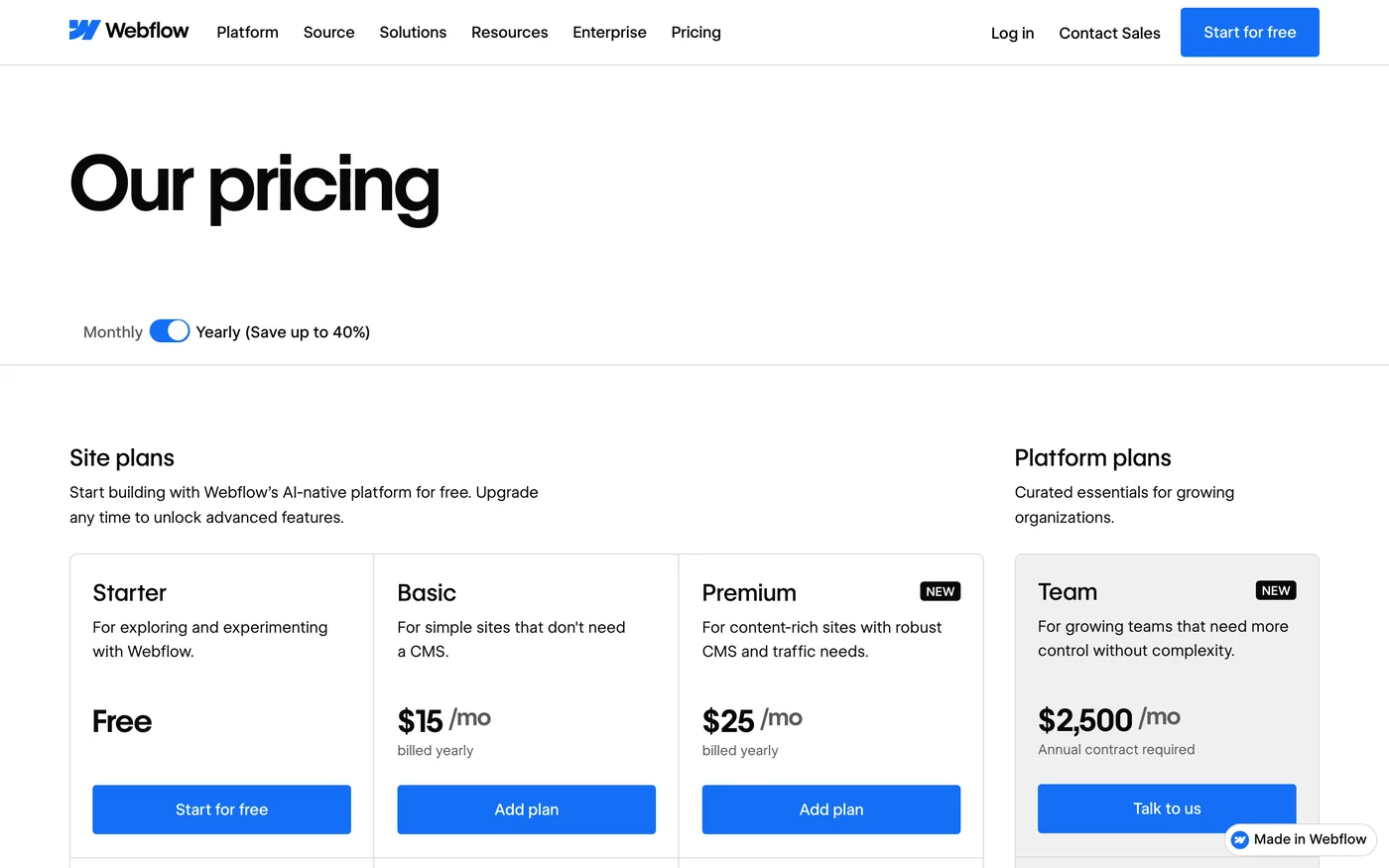
Webflow prices per site. Starter is free on a Webflow subdomain with two static pages, 1 GB of bandwidth and 50 form submissions; Basic is $15 a month with your own domain, 300 static pages, 10 GB of bandwidth and unlimited form submissions, but no CMS; Premium is $25 and adds the Webflow CMS, site search, code components and form file upload, with bandwidth bought in steps from 50 GB up. Above that the ladder jumps: Team is $2,500 a month on an annual contract and brings Webflow Localize, publishing workflows, single-page publishing, an activity log and priority support; Enterprise is a sales conversation. Ecommerce is a separate set of plans rather than a feature of the site plans, covered below.
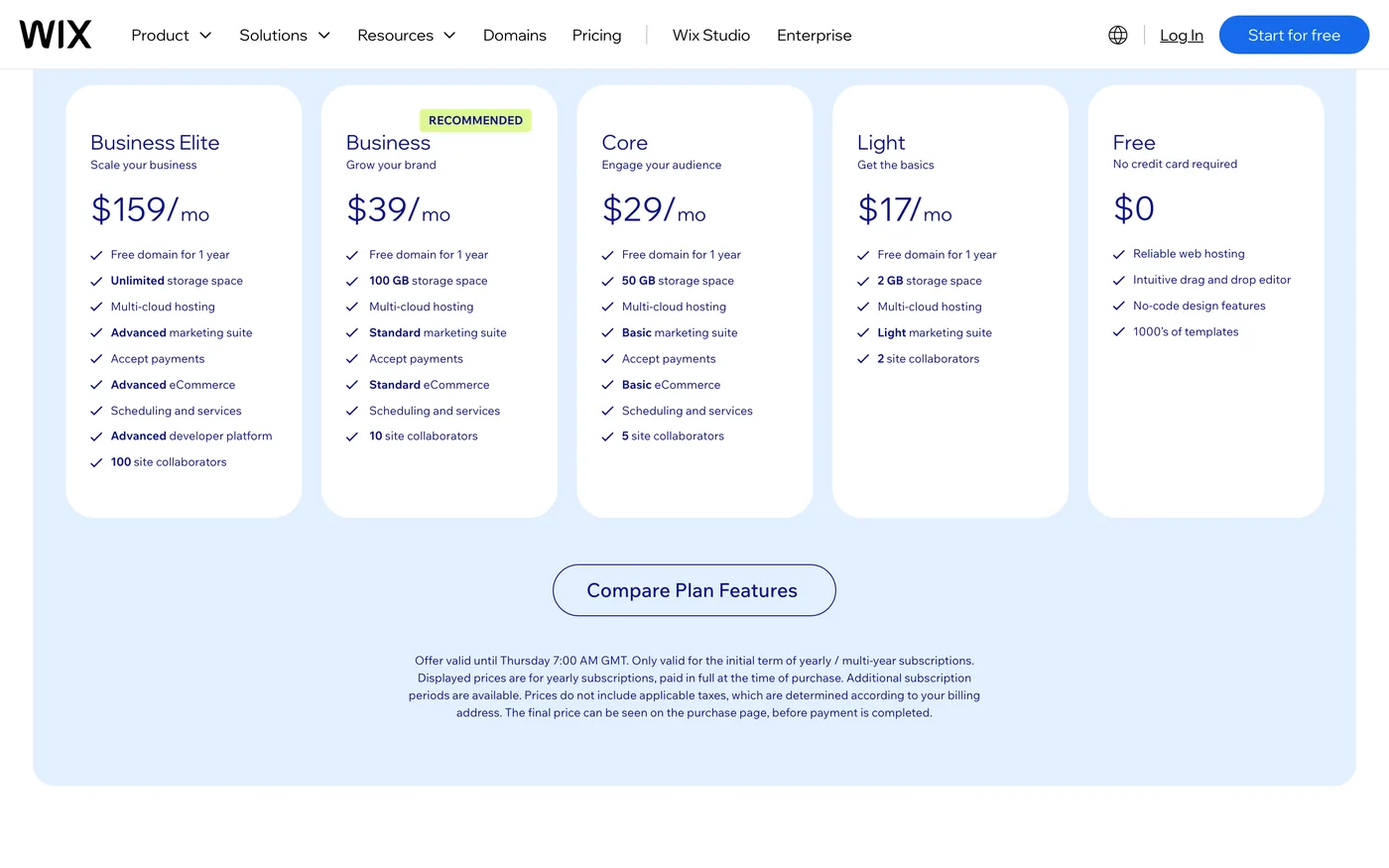
Wix prices per site too, and the ladder is flatter. Free has no time limit; Light is $17 a month with 2 GB of storage, two collaborators and a “light marketing suite”; Core is $29 with 50 GB, five collaborators, and is the first plan that accepts payments; Business is $39 with 100 GB, ten collaborators and “standard eCommerce”; Business Elite is $159 with unlimited storage, a hundred collaborators and “advanced eCommerce”. Every paid plan carries a free domain for the first year and a 14-day money-back guarantee. There is no $2,500 step; Enterprise is a demo booking.
USD per month
Monthly price billed yearly, read on 16 September 2026. Webflow's Premium is the first plan with its CMS; Wix's Core is the first that sells.
Read the ladders, not the entry prices. For a brochure site with a blog, Webflow is $25 for the CMS and Wix is $17 or $29 depending on whether you need payments. For a store, Wix Business at $39 competes with Webflow Ecommerce Standard at $29 plus its 2% fee. For a team that wants publishing workflows and an activity log, Webflow's answer is $2,500 a month and Wix's is $159 — and that single row is why agencies with many small clients often end up on one and design-led companies with one big site on the other.
USD per month
The highest self-serve or listed plan on each pricing page on 16 September 2026. Webflow's Team plan requires an annual contract.
CMS, bandwidth and what “scale” means on each
This is the row that most often decides it. Webflow's CMS starts on Premium at $25, and the pricing page sells scale in bandwidth steps — 50 GB, 100 GB, 150 GB and so on up to 2.5 TB — with site search and code components alongside. It is the plan content-heavy marketing sites live on, and the things a growing content team asks for next (workflows, single-page publishing, an activity log and API) are on Team. Wix sells scale in storage — 2 GB, 50 GB, 100 GB, unlimited — and in collaborators, and its plans page does not itemise the CMS at all; the blog and the “powerful business tools” are described as included, not metered.
The honest reading: Webflow tells you exactly what you are buying at each step, and charges per step. Wix tells you less and charges less at the top. If you can name the collections your site needs and count the editors who will touch them, Webflow's page answers your questions. If the answer is “a blog and a few pages, and my colleague”, Wix's page already covers it.
Ecommerce
If the site sells, the shape of the ladder matters more than the numbers. Wix folds the store into its site plans from Core up, so a Wix store is one bill: Core has “basic eCommerce”, Business “standard”, Business Elite “advanced”, and Wix marks Business as the recommended plan. Webflow separates it: an Ecommerce plan replaces the site plan. Standard is $29 a month with 500 ecommerce items, a custom cart and checkout, and a 2% transaction fee; Plus is $74 with 5,000 items, no transaction fee and unbranded emails; Advanced is $212 with 15,000 items. So a Webflow store that does any real volume is on Plus, and at $74 it is the most expensive store plan in this post below Business Elite.
Webflow's store is a design-led store, built for a brand whose site is the product. If the shop is the whole business rather than a section of the site, read Shopify vs Wix as well, because the honest answer may be neither of these two.
Templates
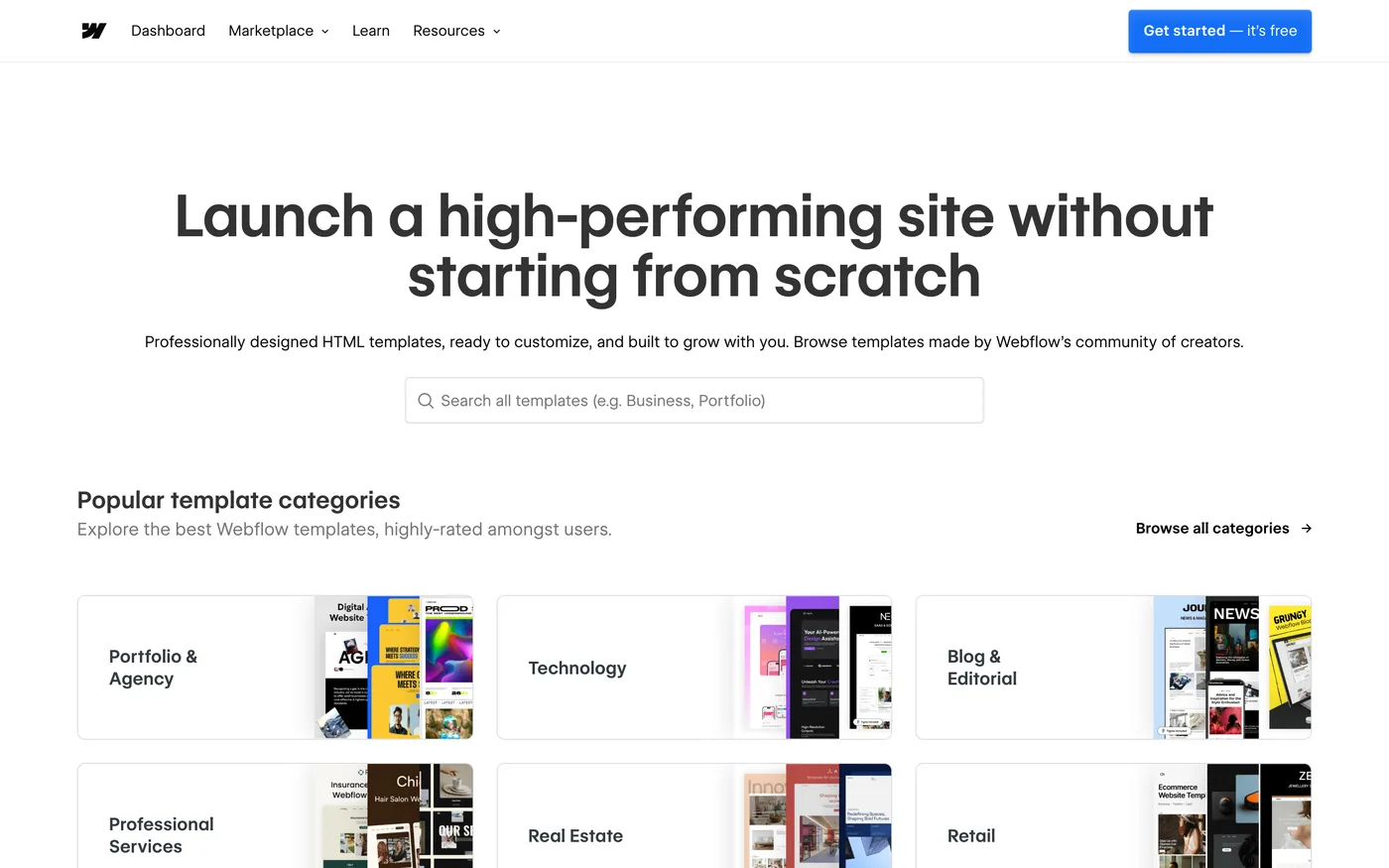
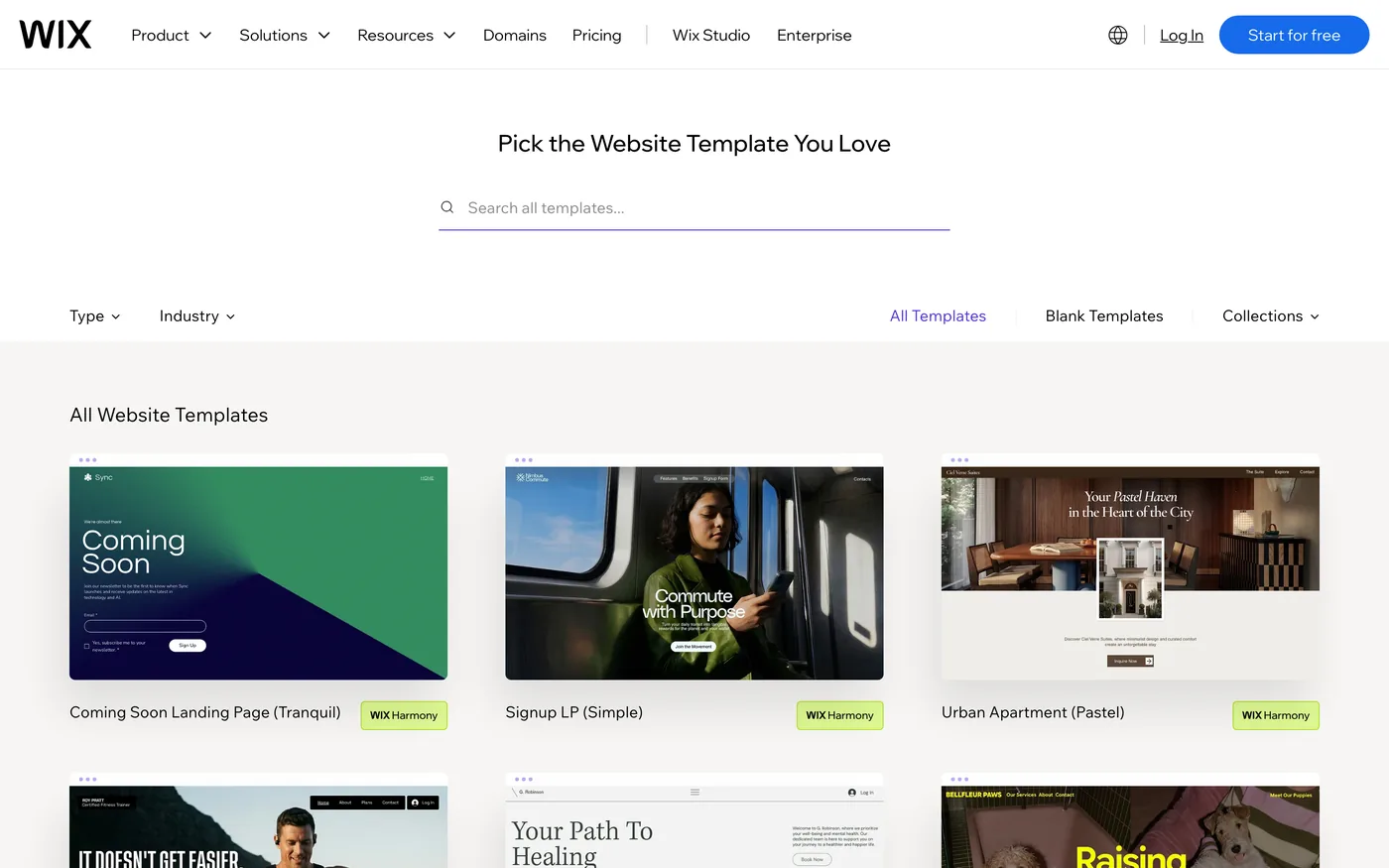
Wix's gallery is organised by trade — fitness trainer, therapy practice, vacation rental — and the template is the starting point most Wix sites never leave. Webflow's marketplace is organised by design category — portfolio and agency, technology, blog and editorial — many templates are paid, and the expectation is that a designer will take one apart. Both are true to their audience, and both galleries are the fastest way to find out which audience you are in: spend ten minutes in each and notice which one you keep clicking.
Custom code, apps and localisation
Both take a pasted script and both have an app directory. On Webflow, site-wide code goes in Site settings → Custom code, needs a paid site plan, and does not run in the Designer preview — you publish, then check the live site. Collection pages inherit it automatically. On Wix, the panel is Settings → Custom code, with a choice of head, body-start or body-end placement, on a site that is published with a connected domain. Webflow's Apps marketplace installs through OAuth and is the route that works without touching the code panel; Wix's App Market does the same job on its side.
Localisation is the one add-on Webflow prices on the page: Localize Essential from $9 a month and Localize Advanced from $29, by number of locales, with AI translation, CMS and static-page localisation, and on Advanced localised URLs and automatic visitor routing. Wix's plans page does not itemise multilingual sites, so we cannot compare the cost here; if you need three languages, that is a question to answer before choosing.
How Matter Chat installs on each
This is the part we know from the inside. Matter Chat answers visitors from the pages you already published — services, pricing, FAQs, CMS articles — with a citation to the page, and refuses instead of guessing when the content does not cover the question. On both platforms there is an app route and a paste route, and on both the crawler reads CMS pages the same way it reads static ones.
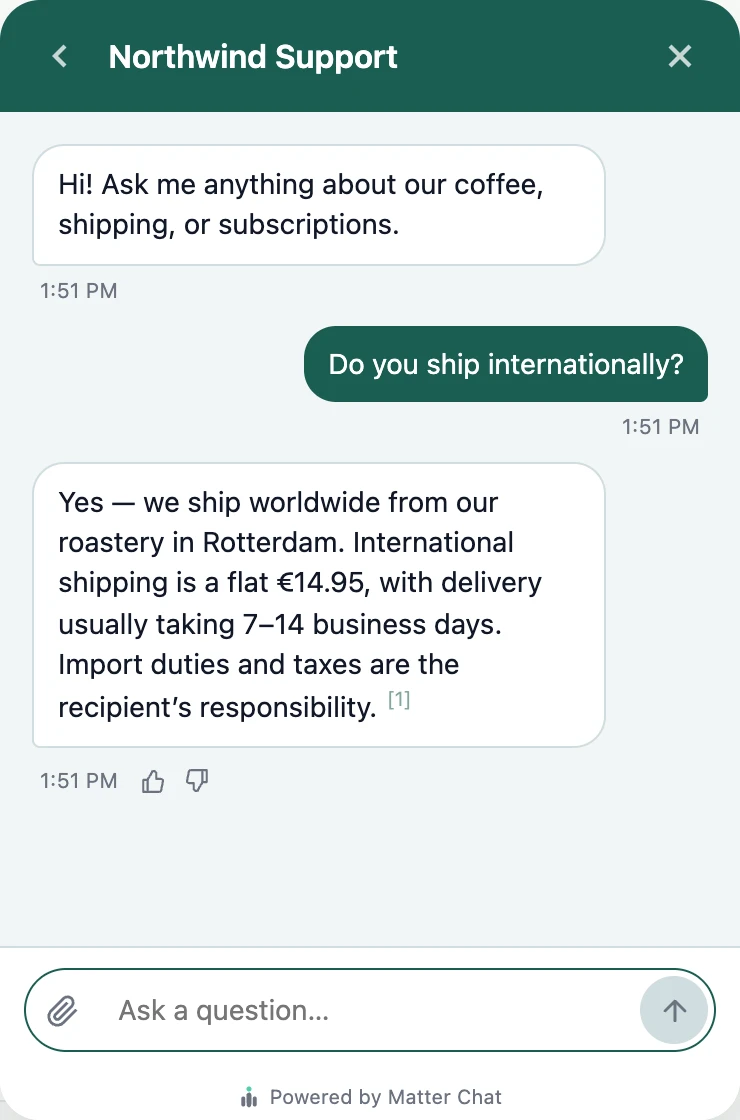
On Webflow
From the bot's Install tab, press Connect Webflow. That authorises our Webflow app, you pick the site, and we register the widget loader as site custom code and publish — the same pinned, integrity-checked script a pasted snippet carries, so it is byte-for-byte the same widget. The manual route is Site settings → Custom code → Footer code, which needs a paid site plan and shows up after you publish, not in the Designer preview. It reaches CMS collection pages either way. The Webflow page has the click path, and the best AI chatbot for a Webflow site compares us with five others on that platform specifically.
On Wix
From the Install tab, press Add to Wix, approve the app, and we embed the widget script through Wix's Embedded Scripts API and pre-allow the site's domain — no panel, nothing pasted. The manual route is Settings → Custom code, the snippet set to load on all pages in the Body – end position. The Wix guide covers both, including what to do when the site is not yet published.
Whichever builder you pick, the bill for the assistant is the same shape: a reply is one answer to a visitor, the plan has a hard daily cap instead of overage, and the pricing page is the whole price list. If you build sites for clients, the Agency tier carries your brand rather than ours, with a login per client and one console across all of them.
Webflow vs Wix: which is best?
The verdict
Which one, for whom

ChooseWebflow if…
- A designer is building the site and the layout has to be exact.
- The content will live in a CMS with real collections, edited by people who are not the designer.
- You need localisation you can price from the page, or a store whose design is the brand.
- You are an agency handing sites to clients and want per-site plans and an Editor built for that handoff.
ChooseWix if…
- The owner is building the site, and wants it live today from a template for their trade.
- You want a free plan to start on and a flat ladder that tops out at $159 without a sales call.
- The store, bookings and the site should be one bill from $29.
- A colleague needs a login on day one; Core includes five collaborators.
Neither, if the shop is the business — that comparison is Shopify vs Wix — or if you are choosing between two designer tools, in which case Webflow vs Framer is the one to read.
Questions people ask
- Is Webflow cheaper than Wix?
- At the entry, yes by $2: Webflow Basic is $15 against Wix Light at $17. With a CMS, Webflow Premium is $25 against Wix Core at $29. With a store, Webflow Ecommerce Standard is $29 plus a 2% transaction fee against Wix Business at $39. At the top, Wix Business Elite is $159 against Webflow Team at $2,500. Prices read on 16 September 2026.
- Does Webflow have a free plan?
- Yes. Starter is free on a Webflow subdomain with two static pages, limited CMS, 1 GB of bandwidth and 50 form submissions. Publishing to your own domain needs a paid site plan.
- Can Wix do what Webflow does for designers?
- Wix's answer for designers and agencies is Wix Studio, a separate product from the editor the plans page describes. This post compares the standard Wix plans with Webflow's site plans; if you are an agency, compare Wix Studio's own pricing before deciding.
- Which is better for ecommerce, Webflow or Wix?
- Wix includes the store from Core ($29) up and recommends Business ($39). Webflow sells separate Ecommerce plans — Standard $29 with a 2% fee and 500 items, Plus $74 with no fee and 5,000 items, Advanced $212. For a design-led brand store Webflow's cart and checkout are custom; for a store that is the whole business, read the Shopify vs Wix comparison too.
- Does custom code need a paid plan on Webflow or Wix?
- On Webflow, site-wide custom code needs a paid site plan and appears on the published site, not in the Designer preview. On Wix, the custom-code panel is available on a published site with a connected domain.
- Can I add an AI support chatbot to Webflow or Wix?
- Yes. Matter Chat installs on Webflow through Connect Webflow, which places the script as site custom code, or a pasted snippet in Footer code; and on Wix through Add to Wix, which embeds the script through Wix's API, or a pasted snippet. It answers from your published pages with a citation and refuses when they do not cover the question.
Receipts
where every number came from
- 01Webflow Starter free: 2 static pages, 1 GB bandwidth, 50 form submissionswebflow.com/pricingread 16 Sep 2026
- 02Webflow Basic $15/mo yearly: 300 static pages, 10 GB, no CMS; Premium $25/mo: Webflow CMS, site search, code componentswebflow.com/pricingread 16 Sep 2026
- 03Webflow Team $2,500/mo, annual contract: Localize, publishing workflows, activity log, priority supportwebflow.com/pricingread 16 Sep 2026
- 04Webflow Ecommerce: Standard $29 (500 items, 2% fee), Plus $74 (5,000 items, 0%), Advanced $212 (15,000 items, 0%)webflow.com/pricingread 16 Sep 2026
- 05Webflow Localize Essential from $9/mo, Advanced from $29/mo, by localeswebflow.com/pricingread 16 Sep 2026
- 06Wix plans: Free $0, Light $17, Core $29, Business $39 (recommended), Business Elite $159, yearlywix.com/plansread 16 Sep 2026
- 07Wix storage 2 GB / 50 GB / 100 GB / unlimited; collaborators 2 / 5 / 10 / 100; payments from Corewix.com/plansread 16 Sep 2026
- 08Wix: 24/7 customer care on all plans; 14-day money-back; free domain for 1 yearwix.com/plansread 16 Sep 2026
- 09Wix custom code needs a published site with a connected domain; head, body-start or body-endsupport.wix.comread 16 Sep 2026
9 lines · prices change · the page is the source